This view displays the status for sent messages for the last 30 days.
Follow these steps:
- Select an organisation or sub-organisation.
- Select Send message history.
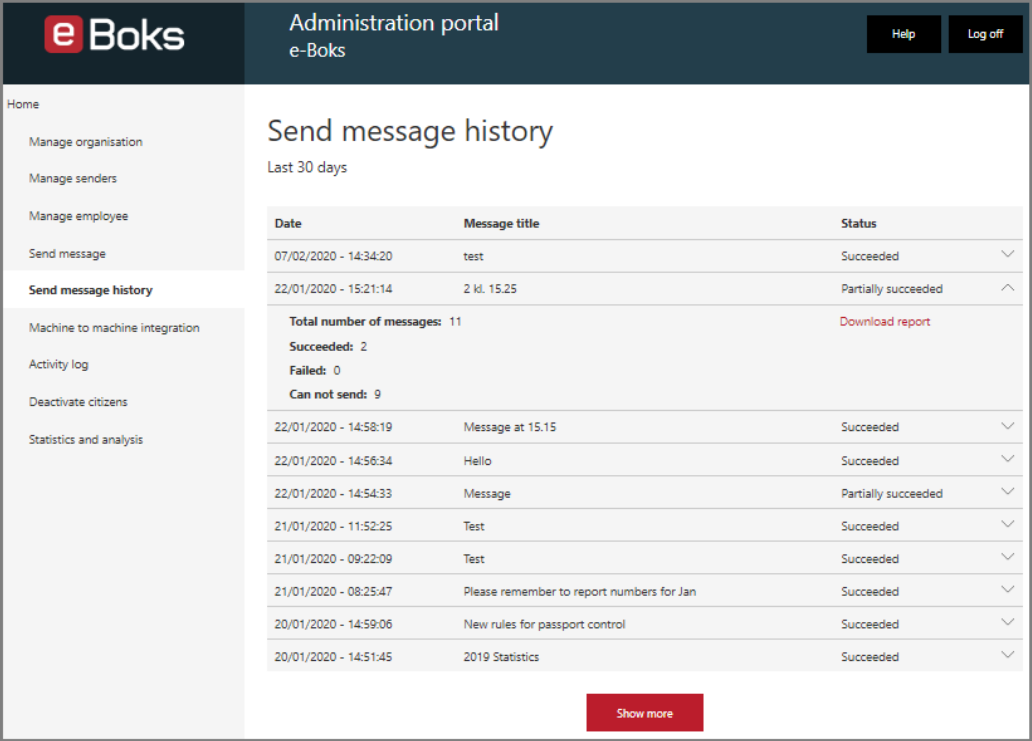
An employee with permission to Send message is able to see own messages.
An employee with the permission Can access send message history is about to see the history for all sent messages - from individual employees and machine to machine.
Click the chevron to see a message status summary.
| Status | Description, action and mitigation |
| Succeeded | Dispatch was OK. No action needed. |
| Partially succeeded | Some of the messages could not be sent. Download the report to find the messages that failed or did not get sent. Failed: The message may contain a virus, which causes e-Boks to reject it, or your system may be congested. Investigate error, fix the problem and try again. Cannot send: The citizen has not registered the sender, which means that e-Boks cannot deliver. Seek alternative way to communicate with the citizen |
| In progress | The message is being sent. Wait. |
| Failed | The message may contain a virus, which causes e-Boks to reject it, or your system may be congested. Investigate message or batch, fix the problem and try again. |
To see which messages that failed, download the report.
For investigative purposes, go to Activity log to find when and by whom a message was sent.